
Getting Scene Mesh Data Development Guide
When reconstructing LCC data, the LCC Unity SDK also generates Mesh data used for collisions. Besides collision detection, the SDK provides the ability to extract this Mesh data, convert it into Unity Mesh objects, and visualize it, which is convenient for scenarios such as exporting and baking NavMesh.
The following uses a complete example to describe the steps for synchronously getting all Mesh data and for getting Mesh data of a specified range on demand.
Environment Setup
Create a brand-new scene in Unity. Unity creates Main Camera and Directional Light by default.
Set up Main Camera
Select Main Camera in the Hierarchy window, and set its properties in the Inspector window as shown below.
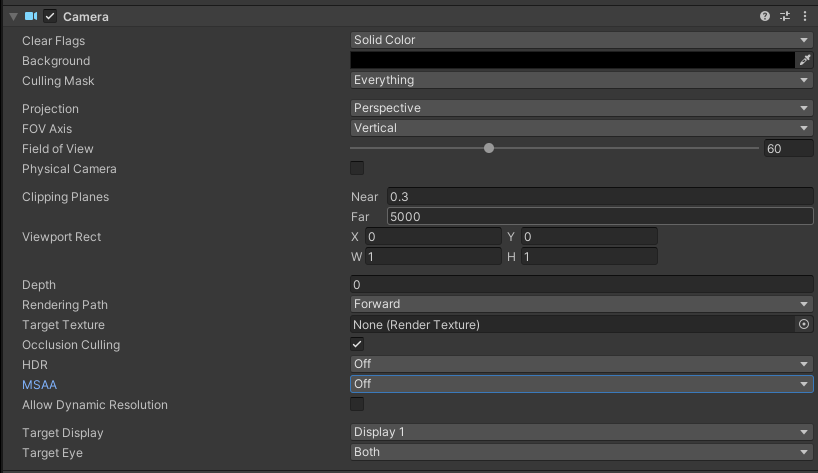
Set the Main Camera properties
Create LCCManager
Right-click an empty area in the Hierarchy window, select Create Empty from the pop-up menu to create an empty GameObject, name it LCCManager, normalize its Transform, and add the LCCManager script to it via Add Component.
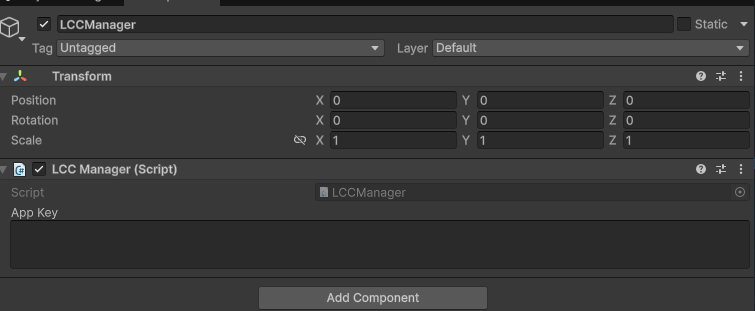
Create the LCCManager GameObject and add the LCCManager script
Create LCCRenderer
Right-click an empty area in the Hierarchy window, select Create Empty to create an empty GameObject, name it LCCRenderer, and set its Transform to Rotation.x = -90 and Scale.x = -1.
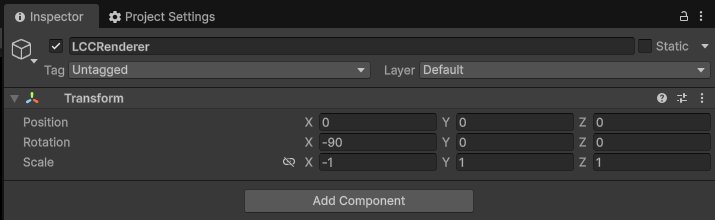
Create LCCRenderer and set its Transform (Rotation.x = -90, Scale.x = -1)
Note:
The Transform settings of the LCCRenderer GameObject (Rotation.x = -90, Scale.x = -1) align it with the LCC data coordinate system. For details on coordinate system alignment, see "LCC Data Coordinate System" in Unity SDK Introduction.
Data prerequisites
The prerequisite for getting Mesh data to take effect is that the scene carries the corresponding collision Mesh data (generated when LCC Studio reconstructs it). In addition, this capability has the following constraints:
- PC / Mac only, and only local data sources are supported (HTTP data sources are not supported).
- Can only be called on the main thread.
- Native-format data (PLY / SOG / SPZ / splat / ksplat) does not carry collision Mesh data; calling the related methods returns
null.
Data reconstructed in earlier versions may not contain collision data, in which case calling GetMeshes() returns null.
Synchronously Get All Mesh Data
Synchronously getting all Mesh data means reading the geometry data of all collision Mesh blocks in the scene at once, implemented through the Renderer.GetMeshes() method.
Create a new C# script named Meshes.cs with the following code:
using System.Collections.Generic;
using LCCCore;
using UnityEngine;
using UnityEngine.Rendering;

public class Meshes : MonoBehaviour
{
    public LCCManager m_manager;
    public string m_FilePath;
    private LCCCore.Renderer m_renderer;
    private bool m_isLoaded = false;
    private Camera m_camera;

    private const string kContainerName = "LCCVisualizedMeshes";

    void Start()
    {
        m_camera = Camera.main;
        m_isLoaded = false;
        m_manager.SetPlatformType(PlatformType.PC);

        m_renderer = m_manager.GetRender(this.transform);
        m_renderer.Load(m_FilePath,
            p => Debug.Log($"[Meshes] load progress: {p:P1}"),
            () =>
            {
                Debug.Log($"[Meshes] file loaded: {m_FilePath}");
                m_isLoaded = true;
                m_manager.SetAutoFov(false);
            },
            e => Debug.LogError($"[Meshes] file load error: {e}")
        );
    }

    public void onGetAllMeshes()
    {
        if (!m_isLoaded || m_renderer == null)
        {
            Debug.LogWarning("[Meshes] Data has not finished loading; cannot get Meshes.");
            return;
        }

        var meshes = m_renderer.GetMeshes();
        if (meshes == null || meshes.Count == 0)
        {
            Debug.LogWarning("[Meshes] No Meshes obtained (data may not contain colliders).");
            return;
        }

        VisualizeMeshes(meshes);
    }

    private void VisualizeMeshes(List<LCCMeshBlock> meshes)
    {
        // Clean up the previous visualization result to avoid piling up
        Transform root = m_renderer.Transform;
        Transform old = root.Find(kContainerName);
        if (old != null) Destroy(old.gameObject);

        var container = new GameObject(kContainerName).transform;
        container.SetParent(root, false);

        Material material = CreateVisualMaterial();

        for (int i = 0; i < meshes.Count; i++)
        {
            LCCMeshBlock block = meshes[i];
            if (block.vertices == null || block.vertices.Length == 0) continue;
            if (block.triangles == null || block.triangles.Length < 3) continue;

            var go = new GameObject(string.IsNullOrEmpty(block.id) ? $"MeshBlock_{i}" : block.id);
            go.transform.SetParent(container, false);

            var mesh = new Mesh { name = go.name };
            // A single block's vertex count may exceed 65535, so 32-bit indices must be used, otherwise the geometry will be corrupted
            mesh.indexFormat = IndexFormat.UInt32;
            mesh.vertices = block.vertices;
            mesh.triangles = block.triangles;
            mesh.RecalculateNormals();
            mesh.RecalculateBounds();

            var mf = go.AddComponent<MeshFilter>();
            mf.sharedMesh = mesh;

            var mr = go.AddComponent<MeshRenderer>();
            mr.sharedMaterial = material;
        }

        Debug.Log($"[Meshes] Created GameObjects and visualized {meshes.Count} Mesh blocks.");
    }

    private Material CreateVisualMaterial()
    {
        Shader shader = Shader.Find("Universal Render Pipeline/Lit")
            ?? Shader.Find("Standard")
            ?? Shader.Find("Diffuse");
        if (shader == null) return null;

        var mat = new Material(shader) { color = new Color(0.7f, 0.7f, 0.7f, 1f) };
        // Collision mesh triangle winding order is not guaranteed consistent; disable back-face culling for complete display
        mat.SetFloat("_Cull", (float)CullMode.Off);
        return mat;
    }
}
Note:
GetMeshes()is a synchronous heavy operation: it synchronously reads from disk, parses, and allocates memory. In large scenes, e.g. a dataset of 262 blocks, it may need to read a large amount of disk data and allocate several GB to tens of GB of managed memory. Call it once and cache the result yourself; never call it every frame.vertices/boundsLocalare in the object local coordinate system, so attaching the visualization GameObject underRenderer.Transformaligns it automatically.- A single block's vertex count may exceed 65535 (measured maximum 390,656); before building your own
Mesh, you must setmesh.indexFormat = IndexFormat.UInt32, otherwise the geometry will be corrupted.- Collision mesh triangle winding order is not guaranteed consistent; the example disables back-face culling (
_Cull = Off) for complete display.
Attach the script to the LCCRenderer GameObject, and in the Inspector drag the LCCManager GameObject onto the Manager property and fill in the File Path.
Then create a Button and associate the onGetAllMeshes() method with its onClick event.
After running, click the Button to see all the collision Meshes in the scene.
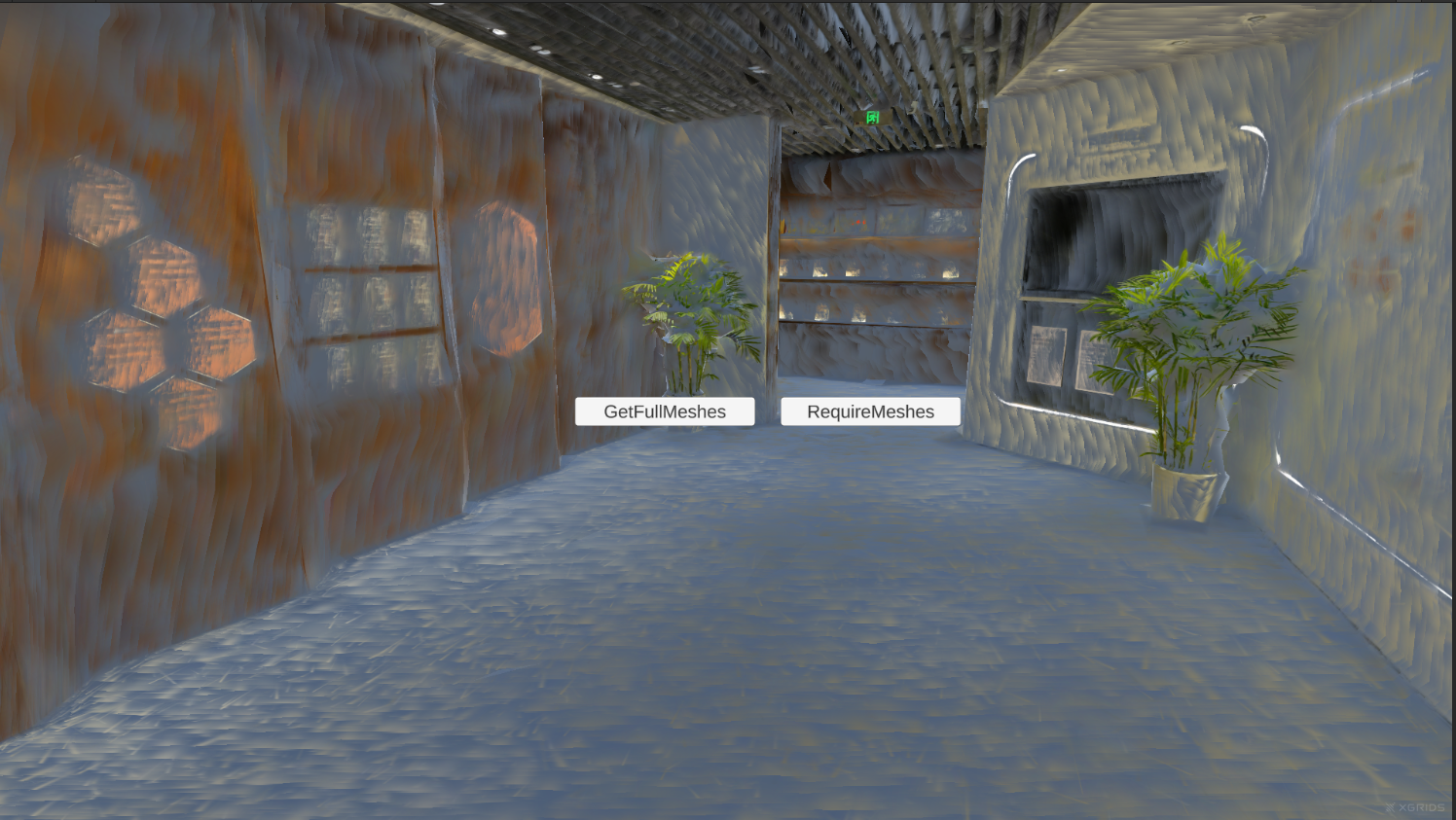
Visualize all collision Mesh data after clicking the button
Get Mesh Data on Demand
On-demand retrieval means reading only the specified part of the Mesh data rather than reading all Mesh data at once, to avoid large I/O and memory overhead. The following uses reading the Mesh blocks within a certain range around the camera as an example.
First use GetMeshBlockInfos() to get the metadata of all blocks (including world-space bounding boxes), compute the distance from the rendering camera center to the block BBOX surface in world coordinates, filter out the block ids with a distance less than 100 m, and then use the parameterized GetMeshes(ids) to read only those blocks.
Add the following methods to Meshes.cs:
public void onRequireMeshes()
{
    if (!m_isLoaded || m_renderer == null)
    {
        Debug.LogWarning("[Meshes] Data has not finished loading; cannot get Meshes.");
        return;
    }

    // 1. Zero-I/O read of all block metadata, filtering blocks within 100 m by the camera-to-BBOX surface distance
    var infos = m_renderer.GetMeshBlockInfos();
    if (infos == null || infos.Count == 0)
    {
        Debug.LogWarning("[Meshes] No Mesh info obtained (data may not contain colliders).");
        return;
    }

    Vector3 camPos = m_camera.transform.position;
    var ids = new List<string>();
    foreach (var info in infos)
    {
        // When the camera is inside the BBOX, ClosestPoint returns the camera itself and the distance is 0, so it is also selected
        if (calculateMinDistanceToAABB(info.boundsWorld, camPos) < 100f)
            ids.Add(info.id);
    }

    if (ids.Count == 0)
    {
        Debug.LogWarning("[Meshes] No Mesh blocks within 100 m of the camera.");
        return;
    }

    // 2. Read only the filtered blocks by id and visualize them
    var meshes = m_renderer.GetMeshes(ids);
    if (meshes == null || meshes.Count == 0)
    {
        Debug.LogWarning("[Meshes] Failed to get Meshes by id.");
        return;
    }

    VisualizeMeshes(meshes);
    Debug.Log($"[Meshes] Selected {ids.Count} blocks within 100 m of the camera, visualized {meshes.Count}.");
}

// Compute the closest distance from a point to the AABB surface (returns 0 when the point is inside the AABB)
private static float calculateMinDistanceToAABB(Bounds _aabb, Vector3 _point)
{
    Vector3 p = _aabb.ClosestPoint(_point);
    return Vector3.Distance(p, _point);
}
Note:
GetMeshBlockInfos()is a zero-I/O, zero-parsing operation that only reads the metadata already in memory; you can call it freely.- The distance filter uses
boundsWorld(world-space bounding box), and the camera center takesCamera.transform.position.- Use
Bounds.ClosestPointto compute the closest distance from a point to the AABB surface: when the camera is inside the BBOX,ClosestPointreturns the camera itself and the distance is 0, so that block is also selected.- The filter radius
100f(unit: meters) in the example can be adjusted as needed.
Create a Button and associate onRequireMeshes() with its onClick event.
After running, click the button to see the Mesh blocks within 100 m of the camera.
Get Mesh data within 100 m of the camera on demand
Key Steps
The key steps for getting and visualizing scene Mesh data:
- Complete the pre-configuration such as
SetPlatformType, and load the LCC scene viaGetRender+Load. - Confirm the data carries collision Mesh data (native formats or data reconstructed in earlier versions may not).
- Full retrieval: call
GetMeshes()to read all blocks at once and cache the result yourself to avoid repeated calls. - On-demand retrieval: first use
GetMeshBlockInfos()to get block world bounding boxes, filter ids by camera distance, then useGetMeshes(ids)to read only the target blocks. - When visualizing, attach the GameObject under
Renderer.Transformto align with local coordinates, and build the Mesh withIndexFormat.UInt32.
Mesh-retrieval APIs
The following methods are all on Renderer; they need to be called after the scene finishes loading, and the data must carry collision Mesh data.
GetMeshBlockInfos
// Return value: List<LCCMeshBlockInfo> → collision Mesh block metadata; null when there is no Mesh or unavailable
public List<LCCMeshBlockInfo> GetMeshBlockInfos()
Returns the metadata of all collision Mesh blocks (id, world/local bounding box, vertex count, face count). Zero-I/O and zero-parsing; only reads the metadata already in memory.
Usage example:
var infos = renderer.GetMeshBlockInfos();
foreach (var info in infos)
{
    Debug.Log($"{info.id}: verts={info.vertexCount}, faces={info.faceCount}, bbox={info.boundsWorld.size}");
}
Notes:
- PC / Mac only + local data source; main thread only.
- Typical usage: first use it to get each block's world BBox, pick out the needed ids, then call
GetMeshes(ids)to read only those blocks. - Native formats (PLY / SOG / SPZ / splat / ksplat) have no Mesh and return
null(which is normal and not logged).
GetMeshes
// Return value: List<LCCMeshBlock> → all collision Mesh geometry data; null when unavailable
public List<LCCMeshBlock> GetMeshes()
Synchronously returns the geometry data of all collision Mesh blocks (vertices + triangle indices, in the local coordinate system). This is a heavy operation (synchronous disk read + parse + allocation); call it once and cache it yourself, never every frame.
Usage example:
var meshes = renderer.GetMeshes();
foreach (var block in meshes)
{
    // block.vertices / block.triangles are in the object local coordinate system
}
Notes:
- PC / Mac only + local data source; main thread only.
- For large scenes, use
GetMeshBlockInfos()to pick ids +GetMeshes(ids)instead, to avoid allocating a huge amount of managed memory at once. - A single block's vertex count can exceed 65535; before building your own Mesh, you must set
mesh.indexFormat = IndexFormat.UInt32.
GetMeshes (by id)
// Return value: List<LCCMeshBlock> → collision Mesh geometry data for the specified ids; null when no hits
public List<LCCMeshBlock> GetMeshes(IEnumerable<string> _ids)
Synchronously returns the geometry data of the collision Mesh blocks with the specified ids (local coordinate system). The ids are provided by GetMeshBlockInfos().
| Parameter | Type | Description |
|---|---|---|
_ids | IEnumerable<string> | The target block id collection (provided by GetMeshBlockInfos()) |
Usage example:
var ids = new List<string> { "block-0", "block-3" };
var meshes = renderer.GetMeshes(ids);
Notes:
- Unknown ids are skipped with a warning; duplicate ids are deduplicated (not read from disk repeatedly); the return order is the traversal order of ids (after deduplication).
- Passing
null, an empty input, or no hits returnsnullwith a warning. - Other constraints are the same as
GetMeshes().
LCCMeshBlockInfo data structure
public struct LCCMeshBlockInfo {
    public string id;           // node id, corresponding to LCCMeshBlock.id
    public Bounds boundsWorld;  // world-space AABB, used to select ids
    public Bounds boundsLocal;  // local-space AABB
    public int vertexCount;     // vertex count
    public int faceCount;       // face count
}
| Field | Type | Description |
|---|---|---|
id | string | Node id, corresponding to LCCMeshBlock.id |
boundsWorld | Bounds | World-space AABB, used to select ids |
boundsLocal | Bounds | Local-space AABB |
vertexCount | int | Vertex count |
faceCount | int | Face count |
LCCMeshBlock data structure
public struct LCCMeshBlock {
    public string id;           // node id
    public Vector3[] vertices;  // vertices, local coordinate system
    public int[] triangles;     // triangle indices, 3 per triangle
    public Bounds boundsLocal;  // bounds in the same space as vertices
}
| Field | Type | Description |
|---|---|---|
id | string | Node id |
vertices | Vector3[] | Vertex array, object local coordinate system |
triangles | int[] | Triangle indices, 3 per triangle |
boundsLocal | Bounds | Bounds in the same space as vertices |
Note:
vertices/boundsLocalare both in the object local coordinate system. To visualize them in Unity, attach the GameObject that holds the Mesh underRenderer.Transformto align automatically. A single block's vertex count can exceed 65535; before building your own Mesh, you must setmesh.indexFormat = IndexFormat.UInt32.