XGRIDSDocs
  • 简体中文
  • English
  • 繁體中文
  • 日本語
  • Deutsch
  • Español
  • Italiano
  • 简体中文
  • English
  • 繁體中文
  • 日本語
  • Deutsch
  • Español
  • Italiano
  • PortalCam

    • Product Overview
    • Basic Operation
    • Using the LCC Scan App
    • Maintenance and Care
    • FAQ
  • Lixel K Series

    • Lixel K1

      • Product Overview
      • Basic Operation
      • Device Activation and Connection
      • Scanning Workflow
      • Acquire Point Cloud Data with Absolute Coordinate
      • Map Fusion
      • Route Planning Suggestions for Typical Scenes
      • Precautions
      • FAQ
    • Lixel K2

      • Product Overview
      • Basic Operation
      • Device Activation and Connection
      • Scanning Workflow
      • Acquire Point Cloud Data with Absolute Coordinate
      • Map Fusion
      • Route Planning Suggestions for Typical Scenes
      • Precautions
      • FAQ
  • Lixel L Series

    • Lixel L2 Pro

      • Product Overview
      • Basic Operation
      • Device Activation and Connection
      • Scanning Workflow
      • Acquire Point Cloud Data with Absolute Coordinate
      • Measure Point
      • Appendix
      • FAQ
  • Lixel Studio

    • Version and Copyright
    • Installation and Activation
    • Software Interface
    • File Operations
    • Project Processing
    • Tools
    • 2D Drawing
    • Applications
    • Settings
    • Device Connection
    • FAQ
  • Lixel CyberColor

    • LCC Studio

      • Getting Started
      • Version and Updates
      • Download and Installation
      • Interface Overview and Navigation
      • Before Reconstruction
      • Model Reconstruction
      • Single Model Reconstruction
      • Map Fusion
      • Aerial-Ground Fusion
      • Aerial Reconstruction
      • My Models
      • Other Features
      • Settings and Account
      • Converter
      • Video Reconstruction
      • FAQ
    • LCC Scene Editor

      • Version & Updates
      • Account & Login
      • Product Overview & Home
      • Editor Interface
      • Scene Navigation Modes
      • File
      • Settings
      • Edit Operations
      • Window
      • Global Toolbar
      • Assets & Properties
      • Left Toolbar
      • Viewpoints
      • Portal
      • Skybox
      • Annotations
      • Measurement
      • Flythrough
      • Scene Report
      • 3D Layout
      • Mini-Map
      • Preview Mode (Viewer)
      • Help
      • FAQ
      • Spawn Point
    • LCC Model Editor

      • Version and Updates
      • User Guide
      • Overview and Interface
      • File Operations
      • Selectors
      • Editing Models
      • Measurement
      • Color Grading
      • Asset Management
      • Settings and Help
      • FAQ
    • Capture Guide

      • Overview
      • Capture Devices Overview
      • General Capture Principles
      • Indoor Scene Capture
      • Outdoor Scene Capture
      • Large-Scale Capture (Map Fusion)
      • Aerial-Ground Map Fusion Capture
      • Object Capture
      • People Capture
      • Video Reconstruction Capture
      • HD Enhancement
      • Control Points (Lixel P1)
      • FAQ and Troubleshooting
    • Version History

Object Capture

Applicable methods: Video reconstruction (phone/camera) or close-range device scanning

Orbit Shooting Method (Recommended)

The core of object capture is multi-layer orbiting — walking a full loop around the object at different heights:

  1. Low orbit: Crouch down, tilt the camera slightly upward, and orbit the object once (covers the bottom)
  2. Mid orbit: Stand at eye level and orbit the object once (covers the main body)
  3. High orbit: Raise the camera or stand higher, look down, and orbit once (covers the top)
  4. Supplement: Add close-range shots of detail-rich areas (logos, textures, seams)
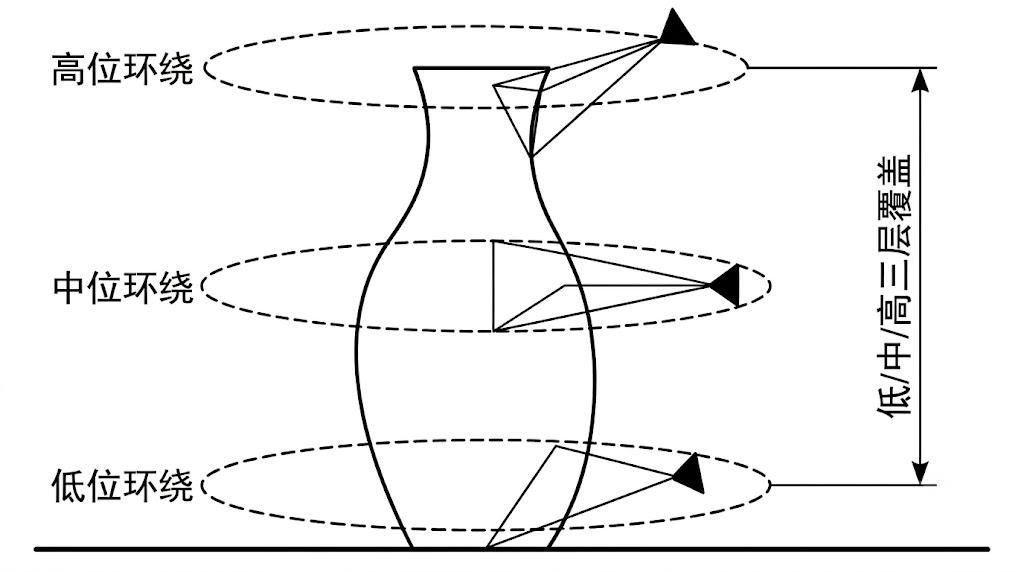
Object Three-Layer Orbit

Object three-layer orbit capture (low/mid/high)

Object Bottom Capture

The bottom of an object is usually occluded and requires a flipping technique:

  1. Orbit and shoot the front of the object normally
  2. Carefully flip the object (or suspend it on a stand)
  3. Shoot the bottom, ensuring sufficient overlap with the front

Object Capture Parameter Recommendations

ItemRecommendation
DistanceObject fills 60%–80% of the frame
Number of orbits2–5 loops (different heights)
Photos per loop30–50 photos (or 30–60 seconds of video)
Total photos120–300 photos
BackgroundClean, non-reflective, contrasting with the object
LightingSoft and even, avoid strong highlights and shadows

Handling Special Objects

Object TypeChallengeRecommendation
Reflective objects (metal, glass)Specular reflectionUse a polarizing filter or apply matting spray
Transparent objectsNo texturePlace reference objects inside or apply spray
Plain-colored objects (white wall, pure black)Insufficient featuresAdd marker points or increase environmental texture
Hair/fine filamentsDetails too fineIncrease the number of photos and shorten shooting distance
Prev
Aerial-Ground Map Fusion Capture
Next
People Capture