
獲取場景 Mesh 數據開發指南
LCC Unity SDK 在重建 LCC 數據時,會同時生成用於碰撞的 Mesh 數據。除了用於碰撞檢測,SDK 還提供了將這份 Mesh 數據提取出來的能力,可將其轉換為 Unity 的 Mesh 對象並可視化,便於導出、烘焙 NavMesh 等場景。
下面通過一個完整的示例,介紹同步獲取全量 Mesh 數據、以及按需獲取指定範圍 Mesh 數據的步驟。
環境設置
在 Unity 中創建一個全新的場景,Unity 默認會創建 Main Camera 和 Directional Light。
設置 Main Camera
在 Hierarchy 窗口中選擇 Main Camera,在 Inspector 窗口中按下圖設置其屬性。
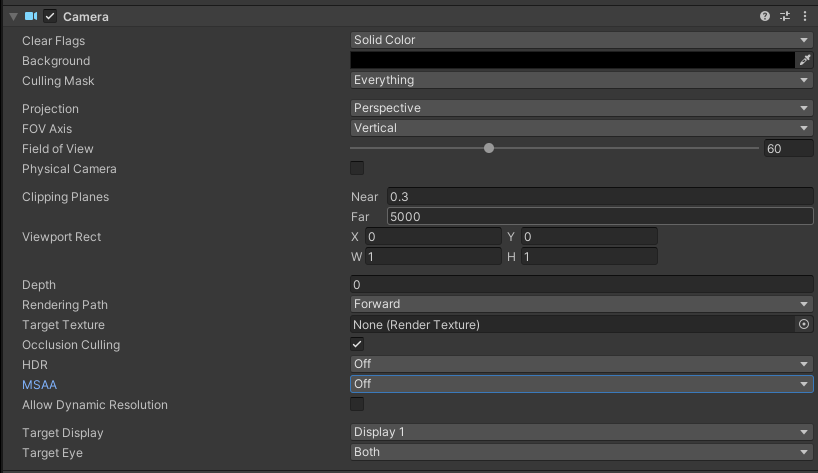
設置 Main Camera 的屬性
創建 LCCManager
在 Hierarchy 窗口空白處單擊鼠標右鍵,在彈出的菜單中選擇 Create Empty,創建一個空遊戲對象,命名為 LCCManager,將其 Transform 歸一,並通過 Add Component 為其添加 LCCManager 腳本。
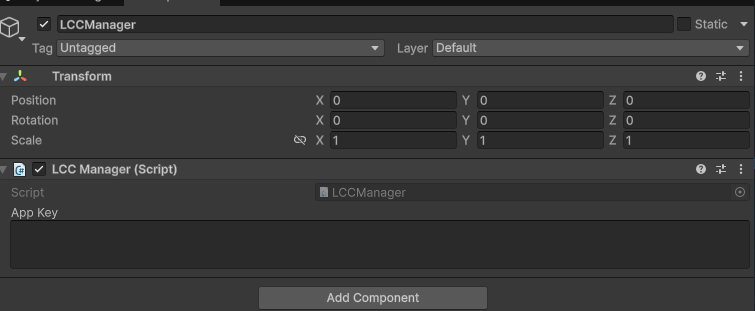
創建 LCCManager 遊戲對象並添加 LCCManager 腳本
創建 LCCRenderer
在 Hierarchy 窗口空白處單擊鼠標右鍵,選擇 Create Empty,創建一個空遊戲對象,命名為 LCCRenderer,將其 Transform 設置為 Rotation.x = -90、Scale.x = -1。
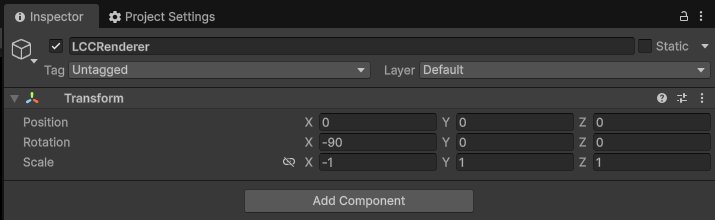
創建 LCCRenderer 並設置 Transform(Rotation.x = -90、Scale.x = -1)
注意:
LCCRenderer 遊戲對象的 Transform 設置(Rotation.x = -90、Scale.x = -1)是與 LCC 數據座標系的對齊。關於座標系對齊的詳細說明,參見 Unity SDK 簡介 中的「LCC 數據座標系」。
數據前置條件
獲取 Mesh 數據生效的前提是場景帶有對應的碰撞 Mesh 數據(由 LCC Studio 重建時生成)。此外,該能力有以下約束:
- 僅 PC / Mac 平台,且僅支持本地數據源(HTTP 數據源不支持)。
- 只能在主線程調用。
- 原生格式數據(PLY / SOG / SPZ / splat / ksplat)不攜帶碰撞 Mesh 數據,調用相關方法會返回
null。
早期版本重建的數據可能不包含碰撞數據,此時調用 GetMeshes() 會返回 null。
同步獲取全量 Mesh 數據
同步獲取全量 Mesh 數據指一次性讀取場景中所有碰撞 Mesh 分塊的幾何數據,通過 Renderer.GetMeshes() 方法實現。
新建一個 C# 腳本,命名為 Meshes.cs,代碼如下:
using System.Collections.Generic;
using LCCCore;
using UnityEngine;
using UnityEngine.Rendering;

public class Meshes : MonoBehaviour
{
    public LCCManager m_manager;
    public string m_FilePath;
    private LCCCore.Renderer m_renderer;
    private bool m_isLoaded = false;
    private Camera m_camera;

    private const string kContainerName = "LCCVisualizedMeshes";

    void Start()
    {
        m_camera = Camera.main;
        m_isLoaded = false;
        m_manager.SetPlatformType(PlatformType.PC);

        m_renderer = m_manager.GetRender(this.transform);
        m_renderer.Load(m_FilePath,
            p => Debug.Log($"[Meshes] load progress: {p:P1}"),
            () =>
            {
                Debug.Log($"[Meshes] file loaded: {m_FilePath}");
                m_isLoaded = true;
                m_manager.SetAutoFov(false);
            },
            e => Debug.LogError($"[Meshes] file load error: {e}")
        );
    }

    public void onGetAllMeshes()
    {
        if (!m_isLoaded || m_renderer == null)
        {
            Debug.LogWarning("[Meshes] 數據尚未加載完成,無法獲取 Mesh。");
            return;
        }

        var meshes = m_renderer.GetMeshes();
        if (meshes == null || meshes.Count == 0)
        {
            Debug.LogWarning("[Meshes] 未獲取到 Mesh(數據可能不含碰撞體)。");
            return;
        }

        VisualizeMeshes(meshes);
    }

    private void VisualizeMeshes(List<LCCMeshBlock> meshes)
    {
        // 清理上一次的可視化結果,避免重複堆積
        Transform root = m_renderer.Transform;
        Transform old = root.Find(kContainerName);
        if (old != null) Destroy(old.gameObject);

        var container = new GameObject(kContainerName).transform;
        container.SetParent(root, false);

        Material material = CreateVisualMaterial();

        for (int i = 0; i < meshes.Count; i++)
        {
            LCCMeshBlock block = meshes[i];
            if (block.vertices == null || block.vertices.Length == 0) continue;
            if (block.triangles == null || block.triangles.Length < 3) continue;

            var go = new GameObject(string.IsNullOrEmpty(block.id) ? $"MeshBlock_{i}" : block.id);
            go.transform.SetParent(container, false);

            var mesh = new Mesh { name = go.name };
            // 單塊頂點數可能超過 65535,必須使用 32 位索引,否則幾何錯亂
            mesh.indexFormat = IndexFormat.UInt32;
            mesh.vertices = block.vertices;
            mesh.triangles = block.triangles;
            mesh.RecalculateNormals();
            mesh.RecalculateBounds();

            var mf = go.AddComponent<MeshFilter>();
            mf.sharedMesh = mesh;

            var mr = go.AddComponent<MeshRenderer>();
            mr.sharedMaterial = material;
        }

        Debug.Log($"[Meshes] 已為 {meshes.Count} 個 Mesh 分塊創建 GameObject 並可視化。");
    }

    private Material CreateVisualMaterial()
    {
        Shader shader = Shader.Find("Universal Render Pipeline/Lit")
            ?? Shader.Find("Standard")
            ?? Shader.Find("Diffuse");
        if (shader == null) return null;

        var mat = new Material(shader) { color = new Color(0.7f, 0.7f, 0.7f, 1f) };
        // 碰撞網格三角形繞序不保證一致,關閉背面剔除以完整顯示
        mat.SetFloat("_Cull", (float)CullMode.Off);
        return mat;
    }
}
說明:
GetMeshes()是同步重操作:會同步讀盤、解析並分配內存。大場景下,如一份 262 塊的數據,可能需讀取大量磁盤數據、分配數GB至數十GB託管內存,請調用一次並自行緩存,切勿每幀調用。vertices/boundsLocal位於物體本地座標系,因此把可視化 GameObject 掛到Renderer.Transform下即可自動對齊。- 單塊頂點數可能超過 65535(實測最大 390,656),自建
Mesh前必須設置mesh.indexFormat = IndexFormat.UInt32,否則幾何會錯亂。- 碰撞網格三角形繞序不保證一致,示例中關閉了背面剔除(
_Cull = Off)以便完整顯示。
將腳本掛載到 LCCRenderer 遊戲對象上,並在 Inspector 中把 LCCManager 遊戲對象拖到 Manager 屬性、填寫 File Path。
然後創建一個 Button,將 onGetAllMeshes() 方法關聯到其 onClick 事件。
運行後點擊 Button,即可看到場景中的全量碰撞 Mesh。
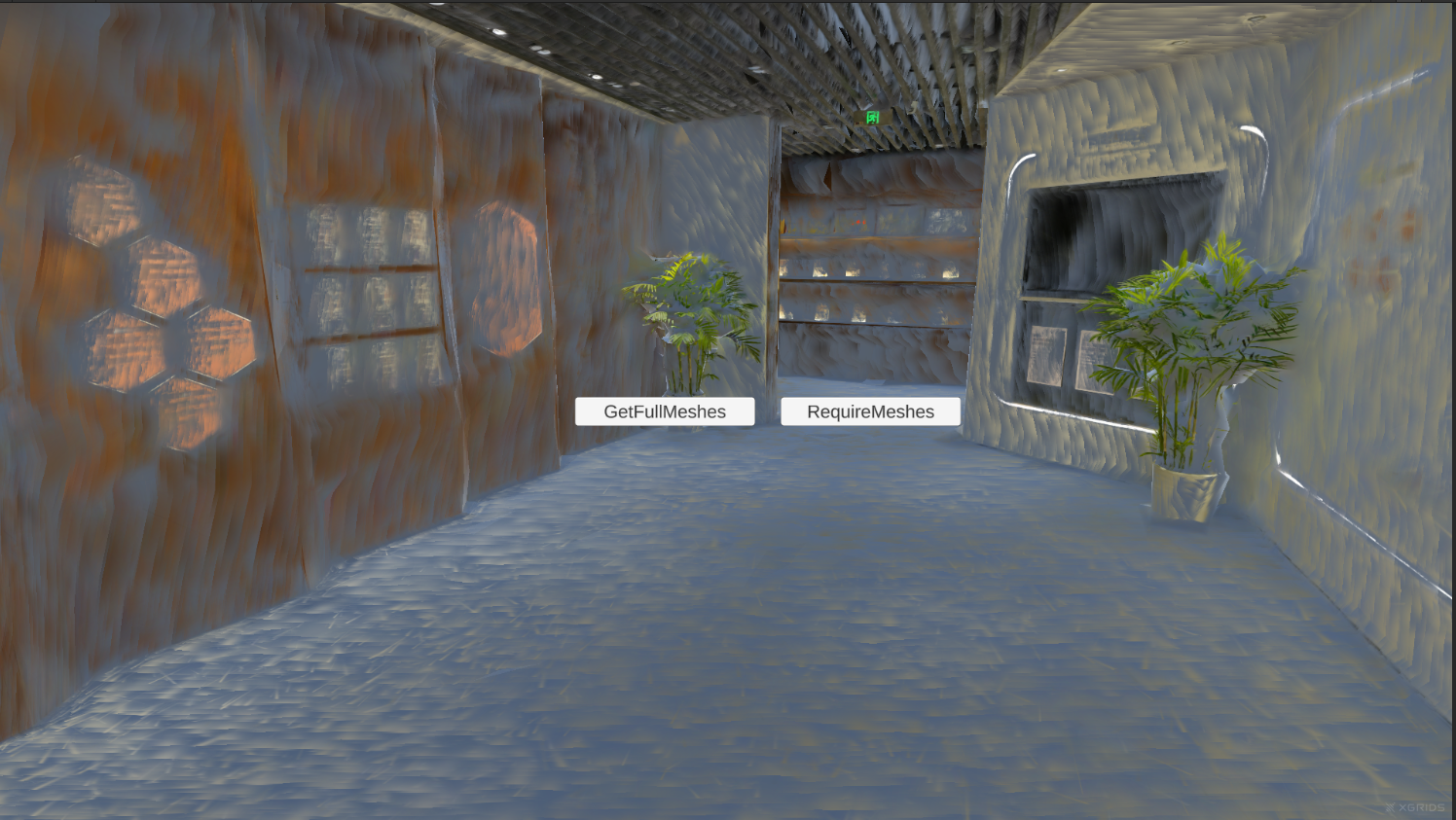
點擊按鈕後可視化全量碰撞 Mesh 數據
按需獲取 Mesh 數據
按需獲取指只讀取指定的部分Mesh數據,而不是一次性讀取全部的Mesh數據,避免造成大的IO和內存開銷,下面以讀取相機周圍一定範圍內的 Mesh 分塊為例。
先通過 GetMeshBlockInfos() 拿到所有分塊的元信息(含世界空間包圍盒),在世界座標系下計算渲染相機中心點到分塊 BBOX 表面的距離,篩選出距離小於 100 m 的分塊 id,再用帶參的 GetMeshes(ids) 只讀取這些分塊。
在 Meshes.cs 中新增以下方法:
public void onRequireMeshes()
{
    if (!m_isLoaded || m_renderer == null)
    {
        Debug.LogWarning("[Meshes] 數據尚未加載完成,無法獲取 Mesh。");
        return;
    }

    // 1. 零 I/O 讀取全部分塊元信息,按相機到 BBOX 表面距離篩選 100 m 內的分塊
    var infos = m_renderer.GetMeshBlockInfos();
    if (infos == null || infos.Count == 0)
    {
        Debug.LogWarning("[Meshes] 未獲取到 Mesh 信息(數據可能不含碰撞體)。");
        return;
    }

    Vector3 camPos = m_camera.transform.position;
    var ids = new List<string>();
    foreach (var info in infos)
    {
        // 相機位於 BBOX 內部時 ClosestPoint 返回相機自身、距離為 0,同樣會被選中
        if (calculateMinDistanceToAABB(info.boundsWorld, camPos) < 100f)
            ids.Add(info.id);
    }

    if (ids.Count == 0)
    {
        Debug.LogWarning("[Meshes] 相機周圍 100m 內沒有 Mesh 分塊。");
        return;
    }

    // 2. 按 id 只讀取篩選出的分塊並可視化
    var meshes = m_renderer.GetMeshes(ids);
    if (meshes == null || meshes.Count == 0)
    {
        Debug.LogWarning("[Meshes] 按 id 獲取 Mesh 失敗。");
        return;
    }

    VisualizeMeshes(meshes);
    Debug.Log($"[Meshes] 相機周圍 100m 內選中 {ids.Count} 個分塊,可視化 {meshes.Count} 個。");
}

// 計算點到 AABB 表面的最近距離(點位於 AABB 內部時返回 0)
private static float calculateMinDistanceToAABB(Bounds _aabb, Vector3 _point)
{
    Vector3 p = _aabb.ClosestPoint(_point);
    return Vector3.Distance(p, _point);
}
說明:
GetMeshBlockInfos()是零 I/O、零解析操作,只讀內存中已有的元信息,可放心調用。- 距離篩選用的是
boundsWorld(世界空間包圍盒),相機中心點取Camera.transform.position。- 使用
Bounds.ClosestPoint計算點到 AABB 表面的最近距離:當相機位於 BBOX 內部時,ClosestPoint返回相機自身、距離為 0,該分塊同樣會被選中。- 示例中的篩選半徑
100f(單位:米)可按需調整。
創建一個 Button,將 onRequireMeshes() 關聯到其 onClick 事件。
運行後點擊按鈕,即可看到相機周圍 100 m 範圍內的 Mesh 分塊。
按需獲取相機周圍 100m 內的 Mesh 數據
關鍵步驟
獲取並可視化場景 Mesh 數據的關鍵步驟:
- 完成
SetPlatformType等前置配置,並通過GetRender+Load加載 LCC 場景。 - 確認數據攜帶碰撞 Mesh 數據(原生格式或早期重建的數據可能不含)。
- 全量獲取:調用
GetMeshes()一次性讀取所有分塊,並自行緩存結果,避免重複調用。 - 按需獲取:先
GetMeshBlockInfos()拿分塊世界包圍盒,按相機距離篩選 id,再GetMeshes(ids)只讀目標分塊。 - 可視化時把 GameObject 掛到
Renderer.Transform下對齊本地座標,並用IndexFormat.UInt32構建 Mesh。
獲取 Mesh 相關 API
以下方法都掛在 Renderer 上,需要場景加載完成後調用,且數據需攜帶碰撞 Mesh 數據。
GetMeshBlockInfos
// 返回值:List<LCCMeshBlockInfo> → 碰撞 Mesh 分塊元信息;無 Mesh 或不可用時返回 null
public List<LCCMeshBlockInfo> GetMeshBlockInfos()
返回全部碰撞 Mesh 分塊的元信息(id、世界/本地包圍盒、頂點數、面數)。零 I/O、零解析,只讀內存中已有的 meta。
調用示例:
var infos = renderer.GetMeshBlockInfos();
foreach (var info in infos)
{
    Debug.Log($"{info.id}: verts={info.vertexCount}, faces={info.faceCount}, bbox={info.boundsWorld.size}");
}
說明:
- 僅 PC / Mac 平台 + 本地數據源;只能主線程調用。
- 典型用法:先用它拿各塊世界 BBox,挑出需要的 id,再調
GetMeshes(ids)只讀那幾塊。 - 原生格式(PLY / SOG / SPZ / splat / ksplat)無 Mesh,返回
null(屬正常情況,不打日誌)。
GetMeshes
// 返回值:List<LCCMeshBlock> → 全部碰撞 Mesh 幾何數據;不可用時返回 null
public List<LCCMeshBlock> GetMeshes()
同步返回全部碰撞 Mesh 分塊的幾何數據(頂點 + 三角形索引,本地座標系)。這是重操作(同步讀盤 + 解析 + 分配),請調用一次並自行緩存,切勿每幀調用。
調用示例:
var meshes = renderer.GetMeshes();
foreach (var block in meshes)
{
    // block.vertices / block.triangles 在物體本地座標系
}
說明:
- 僅 PC / Mac 平台 + 本地數據源;只能主線程調用。
- 大場景請改用
GetMeshBlockInfos()挑 id +GetMeshes(ids),避免一次性分配海量託管內存。 - 單塊頂點數可超 65535,自建 Mesh 前必須設
mesh.indexFormat = IndexFormat.UInt32。
GetMeshes(按 id)
// 返回值:List<LCCMeshBlock> → 指定 id 的碰撞 Mesh 幾何數據;無命中時返回 null
public List<LCCMeshBlock> GetMeshes(IEnumerable<string> _ids)
同步返回指定 id 的碰撞 Mesh 分塊幾何數據(本地座標系)。id 由 GetMeshBlockInfos() 提供。
| 參數 | 類型 | 說明 |
|---|---|---|
_ids | IEnumerable<string> | 目標分塊 id 集合(由 GetMeshBlockInfos() 提供) |
調用示例:
var ids = new List<string> { "block-0", "block-3" };
var meshes = renderer.GetMeshes(ids);
說明:
- 未知 id 跳過並告警;重複 id 去重(不重複讀盤);返回順序為 ids 的遍歷順序(去重後)。
- 入參為
null、為空、或無一命中時返回null並告警。 - 其餘約束同
GetMeshes()。
LCCMeshBlockInfo 數據結構
public struct LCCMeshBlockInfo {
    public string id;           // 節點 id,與 LCCMeshBlock.id 對應
    public Bounds boundsWorld;  // 世界空間 AABB,用於挑選 id
    public Bounds boundsLocal;  // 本地空間 AABB
    public int vertexCount;     // 頂點數
    public int faceCount;       // 面數
}
| 字段 | 類型 | 說明 |
|---|---|---|
id | string | 節點 id,與 LCCMeshBlock.id 對應 |
boundsWorld | Bounds | 世界空間 AABB,用於挑選 id |
boundsLocal | Bounds | 本地空間 AABB |
vertexCount | int | 頂點數 |
faceCount | int | 面數 |
LCCMeshBlock 數據結構
public struct LCCMeshBlock {
    public string id;           // 節點 id
    public Vector3[] vertices;  // 頂點,本地座標系
    public int[] triangles;     // 三角形索引,每 3 個一組
    public Bounds boundsLocal;  // 與 vertices 同空間的包圍盒
}
| 字段 | 類型 | 說明 |
|---|---|---|
id | string | 節點 id |
vertices | Vector3[] | 頂點數組,物體本地座標系 |
triangles | int[] | 三角形索引,每 3 個一組 |
boundsLocal | Bounds | 與 vertices 同空間的包圍盒 |
注意:
vertices/boundsLocal都在物體本地座標系。要在 Unity 中可視化,把承載 Mesh 的 GameObject 掛到Renderer.Transform之下即可自動對齊。單塊頂點數可超過 65535,自建 Mesh 前必須設置mesh.indexFormat = IndexFormat.UInt32。