XGRIDSDocs
  • 简体中文
  • English
  • 繁體中文
  • 日本語
  • Deutsch
  • Español
  • Italiano
  • 简体中文
  • English
  • 繁體中文
  • 日本語
  • Deutsch
  • Español
  • Italiano
  • PortalCam

    • Product Overview
    • Basic Operation
    • Using the LCC Scan App
    • Maintenance and Care
    • FAQ
  • Lixel K Series

    • Lixel K1

      • Product Overview
      • Basic Operation
      • Device Activation and Connection
      • Scanning Workflow
      • Acquire Point Cloud Data with Absolute Coordinate
      • Map Fusion
      • Route Planning Suggestions for Typical Scenes
      • Precautions
      • FAQ
    • Lixel K2

      • Product Overview
      • Basic Operation
      • Device Activation and Connection
      • Scanning Workflow
      • Acquire Point Cloud Data with Absolute Coordinate
      • Map Fusion
      • Route Planning Suggestions for Typical Scenes
      • Precautions
      • FAQ
  • Lixel L Series

    • Lixel L2 Pro

      • Product Overview
      • Basic Operation
      • Device Activation and Connection
      • Scanning Workflow
      • Acquire Point Cloud Data with Absolute Coordinate
      • Measure Point
      • Appendix
      • FAQ
  • Lixel Studio

    • Version and Copyright
    • Installation and Activation
    • Software Interface
    • File Operations
    • Project Processing
    • Tools
    • 2D Drawing
    • Applications
    • Settings
    • Device Connection
    • FAQ
  • Lixel CyberColor

    • LCC Studio

      • Getting Started
      • Version and Updates
      • Download and Installation
      • Interface Overview and Navigation
      • Before Reconstruction
      • Model Reconstruction
      • Single Model Reconstruction
      • Map Fusion
      • Aerial-Ground Fusion
      • Aerial Reconstruction
      • My Models
      • Other Features
      • Settings and Account
      • Converter
      • Video Reconstruction
      • FAQ
    • LCC Scene Editor

      • Version & Updates
      • Account & Login
      • Product Overview & Home
      • Editor Interface
      • Scene Navigation Modes
      • File
      • Settings
      • Edit Operations
      • Window
      • Global Toolbar
      • Assets & Properties
      • Left Toolbar
      • Viewpoints
      • Portal
      • Skybox
      • Annotations
      • Measurement
      • Flythrough
      • Scene Report
      • 3D Layout
      • Mini-Map
      • Preview Mode (Viewer)
      • Help
      • FAQ
      • Spawn Point
    • LCC Model Editor

      • Version and Updates
      • User Guide
      • Overview and Interface
      • File Operations
      • Selectors
      • Editing Models
      • Measurement
      • Color Grading
      • Asset Management
      • Settings and Help
      • FAQ
    • Capture Guide

      • Overview
      • Capture Devices Overview
      • General Capture Principles
      • Indoor Scene Capture
      • Outdoor Scene Capture
      • Large-Scale Capture (Map Fusion)
      • Aerial-Ground Map Fusion Capture
      • Object Capture
      • People Capture
      • Video Reconstruction Capture
      • HD Enhancement
      • Control Points (Lixel P1)
      • FAQ and Troubleshooting
    • Version History

People Capture

Applicable methods: Video reconstruction (phone/camera), single map reconstruction in Lixel P1 portrait mode

Special Challenges of People Capture

People are dynamic subjects with extra difficulties compared to static objects:

  • People move involuntarily (breathing, blinking, shifting weight)
  • Hair and clothing details are complex
  • Facial expressions need to stay consistent

Full-Body People Capture

Orbit Method (Recommended)

  1. The subject stands still in a natural pose
  2. The photographer slowly orbits around the subject:
    • First loop: eye-level height (chest), covering front and back
    • Second loop: low position (knee height), tilting slightly upward
    • Third loop: high position (above the head), tilting slightly downward
  3. Keep the total duration within 60–90 seconds
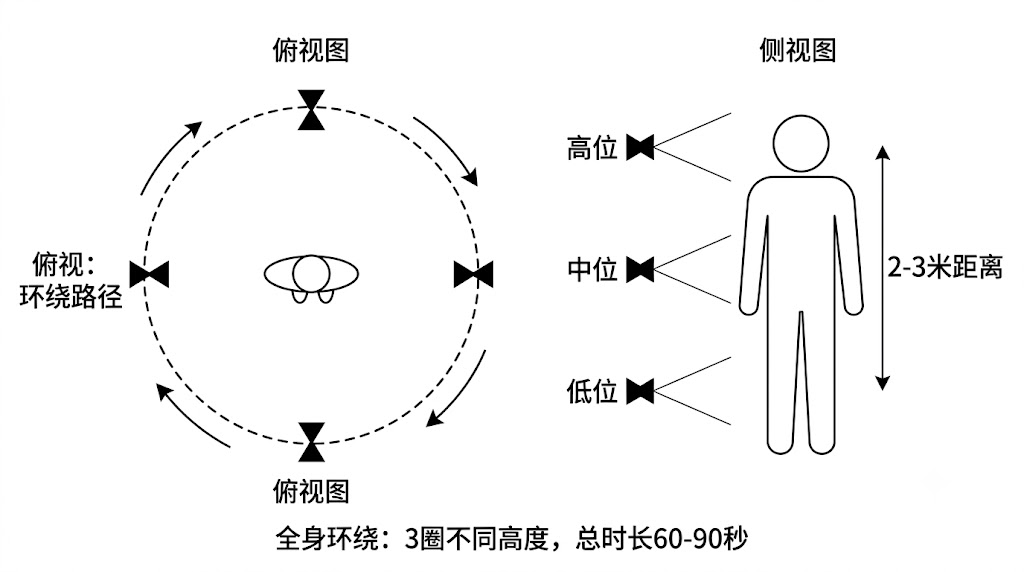
Full-Body People Orbit

Full-body people orbit capture path

Key points:

  • Tell the subject to stay completely still (do not talk, do not blink)
  • Shoot quickly (it is hard for people to stay still for more than 2 minutes)
  • Avoid casting the subject's shadow onto themselves

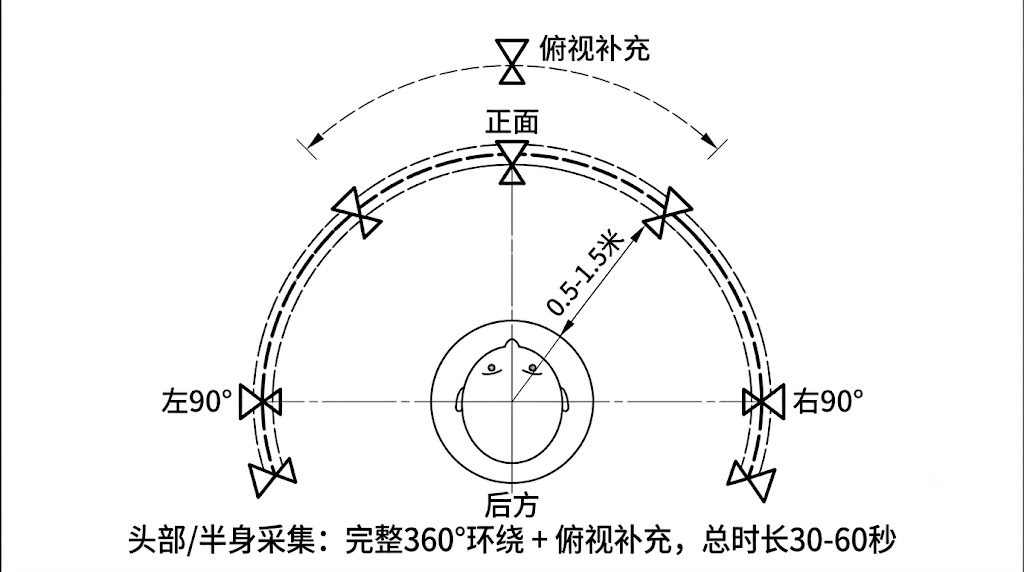
Head/Half-Body People Capture

  1. The subject sits on a chair with a neutral facial expression
  2. The photographer moves slowly in an arc 0.5–1 m in front of the subject:
    • From the front to 90° on the left
    • Back to the front, then to 90° on the right
    • From the front to above the head (top-down)
  3. Total duration 30–60 seconds
Head Capture Arc Path

Head/half-body capture arc path

People Capture Parameter Recommendations

ItemRecommendation
DistanceFull body: 2–3 m; half body: 0.5–1.5 m
Orbit speedAs fast as possible without blur (about 1 m/s)
Total durationFull body 60–90 s; head 30–60 s
LightingSoft frontal light, avoid strong side light causing half-face shadows
BackgroundClean background, contrasting with the subject's clothing
Shutter speed≥1/500s (freeze micro-movements)

People Capture Considerations

  • Hair: Dark long hair easily loses detail; ensure sufficient lighting
  • Glasses: Lens reflections produce artifacts; recommend removing them or using a polarizing filter
  • Loose clothing: Clothing fluttering in the wind produces artifacts; choose fitted clothing
  • Multi-person scenes: Capture only one person at a time, others leave the frame
Prev
Object Capture
Next
Video Reconstruction Capture