
iOS Device Compilation and Packaging Development Guide
Background
LCC Unity SDK is published in the form of precompiled DLLs. Because the iOS platform requires native plugins to be linked as static libraries (__Internal) rather than dynamically loaded (dlopen), you need to complete the additional configuration steps described in this document before building an iOS application. There is a fundamental difference in native plugin loading mechanisms between iOS and other platforms; other platforms (Windows, macOS, Android, Linux) require no additional operations.
This SDK uses "libwebp" as the P/Invoke target when compiled into a DLL. The SDK's built-in Editor/RewriteWebpDllImport.cs script automatically rewrites it to "__Internal" during iOS builds, ensuring that IL2CPP generates the correct direct symbol calls.
Note:
When compiling an iOS device application, first rename
Editor/RewriteWebpDllImport.txtin the SDK package toEditor/RewriteWebpDllImport.csfor the script to take effect. Alternatively, directly change the script's suffix in the SDK package and copy it into the project's Assets/Editor/ directory.
Prerequisites
The RewriteWebpDllImport.cs script uses the IL rewriting library Mono.Cecil during the build, so you need to add it as a dependency to the project first. There are two ways; choose either one.
Method 1: Add via Package Manager (recommended)
Open the Unity menu bar Window → Package Manager, click the + button in the top-left corner, choose Add package by name..., enter the name com.unity.nuget.mono-cecil, enter the version 1.11.5, click Add, and wait for the Package Manager to finish installing, as shown below.
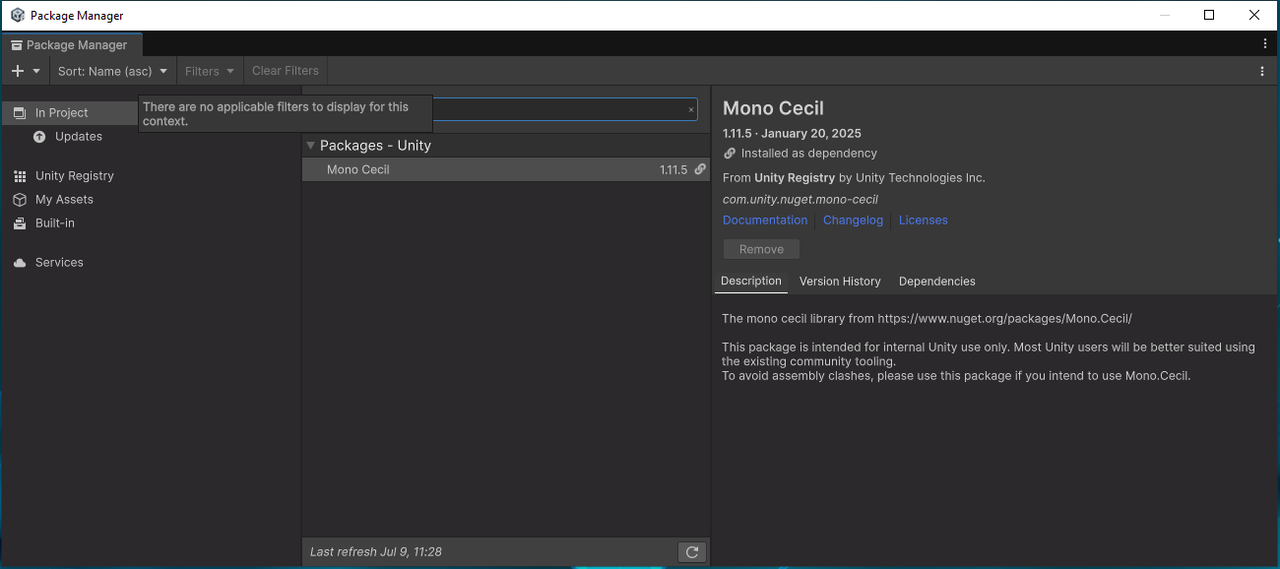
Add com.unity.nuget.mono-cecil by name in the Package Manager
Method 2: Manually edit manifest.json
Directly edit the project's Packages/manifest.json and add a line under dependencies:
{
  "dependencies": {
    "com.unity.nuget.mono-cecil": "1.11.5"
  }
}
After saving, switch back to Unity; the Editor will automatically resolve and install the dependency.
Build Workflow
After completing the prerequisite configuration, follow the standard iOS build workflow; RewriteWebpDllImport will intervene automatically during the build.
- Rename
Editor/RewriteWebpDllImport.txttoEditor/RewriteWebpDllImport.cs(if not already renamed). - In the Unity menu bar, select File → Build Settings, select iOS from the platform list, and click Switch Platform.
- Click Build (or Build And Run), select an output directory, and generate the Xcode project.
- During the build, the script automatically rewrites all
DllImportentries in the SDK targeting"libwebp"to"__Internal". After a successful build, the Console outputs a log similar to:
[RewriteWebpDllImport] Rewrote 77 P/Invoke entries from "libwebp" to "__Internal".
- Open the generated project with Xcode, and in the target's Build Phases → Link Binary With Libraries, confirm that
libwebp.a,libwebpdemux.a, andlibsharpyuv.aare linked. - Connect the iOS device, sign and run in Xcode.
Note:
If the
[RewriteWebpDllImport]log does not appear in the Console, it usually means the script did not take effect — confirm that the file suffix has been changed from.txtto.csand that the Mono.Cecil dependency is correctly installed.
Troubleshooting
| Error message | Cause | Solution |
|---|---|---|
Unable to load DLL 'libwebp' | The script did not take effect, and DllImport still points to the dynamic library name | Confirm that RewriteWebpDllImport.txt has been renamed to .cs, rebuild, and check the Console log |
Cannot find LCCSDK.dll in staging area | The SDK's main DLL was not found during the build, and the rewrite target is missing | Confirm that the SDK is correctly imported into the project and the DLL is not excluded from iOS by Exclude Platform |
Mono.Cecil-related compilation errors (cannot find the Mono.Cecil namespace) | Not installed or version mismatch | Add com.unity.nuget.mono-cecil@1.11.5 according to "Prerequisites" and wait for the compiler to re-resolve |
Notes
- It is recommended to use Unity 2022.3 LTS or higher (including Unity 6); compatibility with Mono.Cecil and IL2CPP cannot be guaranteed on overly old versions.
- If you need to run on the iOS Simulator, confirm that the linked static library contains the
arm64-simulatorarchitecture slice, otherwise the simulator cannot link. - The above configuration only affects the iOS platform. The build workflows of Windows, macOS, Android, and Linux are not affected at all, and there is no need to rename the script or add the Mono.Cecil dependency.