XGRIDSDocs
  • 简体中文
  • English
  • 繁體中文
  • 日本語
  • Deutsch
  • Español
  • Italiano
  • Français
  • Русский
  • Polski
  • Nederlands
  • 简体中文
  • English
  • 繁體中文
  • 日本語
  • Deutsch
  • Español
  • Italiano
  • Français
  • Русский
  • Polski
  • Nederlands
  • PortalCam

    • Product Overview
    • Basic Operation
    • Using the LCC Scan App
    • Maintenance and Care
    • FAQ
  • Lixel K Series

    • Lixel K1

      • Product Overview
      • Basic Operation
      • Device Activation and Connection
      • Scanning Workflow
      • Acquire Point Cloud Data with Absolute Coordinate
      • Map Fusion
      • Route Planning Suggestions for Typical Scenes
      • Precautions
      • FAQ
    • Lixel K2

      • Product Overview
      • Basic Operation
      • Device Activation and Connection
      • Scanning Workflow
      • Acquire Point Cloud Data with Absolute Coordinate
      • Map Fusion
      • Route Planning Suggestions for Typical Scenes
      • Precautions
      • FAQ
  • Lixel L Series

    • Lixel L2 Pro

      • Product Overview
      • Basic Operation
      • Device Activation and Connection
      • Scanning Workflow
      • Acquire Point Cloud Data with Absolute Coordinate
      • Measure Point
      • Appendix
      • FAQ
    • Lixel L3

      • Product Overview
      • Basic Device Functions
      • Device Activation and Connection
      • Data Capture
      • Capturing Absolute Coordinates
      • Appendix
  • Accessories

    • Stick Light

      • Installation Guide
      • Basic Operation
      • FAQ
  • Lixel Studio

    • Version and Copyright
    • Installation and Activation
    • Software Interface
    • File Operations
    • Project Processing
    • Tools
    • 2D Drawing
    • Applications
    • Settings
    • Device Connection
    • FAQ
  • Lixel CyberColor

    • LCC Studio

      • Getting Started
      • Version and Updates
      • Download and Installation
      • Interface Overview and Navigation
      • Before Reconstruction
      • Model Reconstruction
      • Single Model Reconstruction
      • Map Fusion
      • Aerial-Ground Fusion
      • Aerial Reconstruction
      • My Models
      • Other Features
      • Settings and Account
      • Converter
      • Video Reconstruction
      • FAQ
    • LCC Scene Editor

      • Version & Updates
      • Account & Login
      • Product Overview & Home
      • Editor Interface
      • Scene Navigation Modes
      • File
      • Settings
      • Edit Operations
      • Window
      • Global Toolbar
      • Assets & Properties
      • Left Toolbar
      • Viewpoints
      • Portal
      • Skybox
      • Annotations
      • Measurement
      • Flythrough
      • Scene Report
      • 3D Layout
      • Mini-Map
      • Preview Mode (Viewer)
      • Help
      • FAQ
      • Spawn Point
    • LCC Model Editor

      • Version and Updates
      • User Guide
      • Overview and Interface
      • File Operations
      • Selectors
      • Editing Models
      • Measurement
      • Color Grading
      • Asset Management
      • Settings and Help
      • FAQ
    • Capture Guide

      • Overview
      • Capture Devices Overview
      • General Capture Principles
      • Indoor Scene Capture
      • Outdoor Scene Capture
      • Large-Scale Capture (Map Fusion)
      • Aerial-Ground Map Fusion Capture
      • Object Capture
      • People Capture
      • Video Reconstruction Capture
      • HD Enhancement
      • Control Points (Lixel P1)
      • FAQ and Troubleshooting
    • LCC Studio Linux

      • Product Overview
      • Architecture Guide
      • Installation and Deployment Guide
      • Container Startup Parameters Guide
      • CodeMeter Offline Licensing Deployment Guide
      • API Reference
      • Appendix - Developer Data Guide
      • Appendix - Error Code List
      • Single-Machine Multi-GPU Cluster Deployment QuickStart
    • Best Practices

      • Merging Multiple Large 3DGS Models
    • Version History
  • Plugin & SDK

    • Unreal

      • Introduction
      • Quick Start - Windows
      • Quick Start - Linux
      • Quick Start - Quest3
      • Editions and Licensing
      • Rendering
      • Tiled Rasterization (Experimental)
      • Visual Settings
      • Normals and Lighting
      • Scene Editing
      • Performance Parameters
      • Performance Guide
      • Third-party and Engine Plugin Integration
      • Proxy Mesh
      • Loading Animation
      • Collision
      • Navigation System Support
      • Single Layer Water Support
      • Localization
      • FAQ
      • Troubleshooting
      • Logging and Diagnostics
      • Contact Us
      • Best Practices

        • Relighting 3DGS with a LixelStudio Mesh
      • API Reference

        • ALCCActorBase
        • ULCCComponentBase
        • ULCCComponent
        • ULCC2Component
        • SOG / SPZ / PLY Actors
        • ALCC2ProxyMesh
        • ALCCClippingVolume
        • ALCCSectionPlane
        • ALCCLoadVolume
        • ULCCUtilLibrary
        • Enums
        • Structs
      • Changelog

        • v3.4.0
        • v3.3.1
        • v3.0.0
        • v2.2.1
        • v1.0.0
        • v0.9.0
        • v0.8.0
        • v0.7.1
        • v0.6.1
        • v0.5.2
        • v0.4.1
        • v0.4.0
        • v0.3.0
        • v0.0.5
        • v0.0.4
        • v0.0.3
        • v0.0.2
        • v0.0.1
    • Web

      • Introduction
      • Rendering Performance Optimization Guide
      • Graphics Configuration
      • FAQ
      • API Reference

        • LCCRender::clearIndexDB
        • LCCRender::dispose
        • LCCRender::load
        • LCCRender::setCamera
        • LCCRender::unload
        • LCCRender::update
        • LCCObject::checkRenderNextFrame
        • LCCObject::clearRenderNextFrame
        • LCCObject::ecef2Prj
        • LCCObject::getBounds
        • LCCObject::getEnvInstancedMesh
        • LCCObject::getInstancedMesh
        • LCCObject::getLodInfos
        • LCCObject::getOriginPosition
        • LCCObject::getProjectionCoordinateSystemInfos
        • LCCObject::hasCollision
        • LCCObject::hasEnvironment
        • LCCObject::hasShcoef
        • LCCObject::intersectsCapsule
        • LCCObject::intersectsRayExt
        • LCCObject::intersectsRayFromOriginExt
        • LCCObject::intersectsSphere
        • LCCObject::lowerToBottom
        • LCCObject::prj2Ecef
        • LCCObject::raiseToTop
        • LCCObject::raycast
        • LCCObject::raycastFromOrigin
        • LCCObject::setAlpha
        • LCCObject::setClipBox
        • LCCObject::setClipPlane
        • LCCObject::setEndLod
        • LCCObject::setLodAutoLevelUp
        • LCCObject::setMaxDistance
        • LCCObject::setMaxNodeSplats
        • LCCObject::setMaxSplats
        • LCCObject::setOriginPosition
        • LCCObject::setPointsColor
        • LCCObject::setRenderState
        • LCCObject::setRotation
        • LCCObject::setScale
        • LCCObject::setSemantic
        • LCCObject::setSemanticColor
        • LCCObject::setSmooth
        • LCCObject::setStartLod
        • LCCObject::setTranslation
        • LCCObject::setVisible
        • LCCObject::togglePointsDisplayMode
        • LCCObject::useEnvironment
        • LCCObject::useShcoef
      • Changelog

        • v0.6.3
        • v0.6.2
        • v0.6.1
        • v0.6.0
        • v0.5.5
        • v0.5.4
        • v0.5.3
        • v0.5.2
        • v0.5.1
        • v0.5.0
        • v0.4.1
        • v0.4.0
        • v0.3.1
        • v0.3.0
        • v0.2.0
    • Lixel OpenAPI

      • Overview
      • Connection & Authentication
      • Message Model & Codec
      • Interface Catalog
      • Real-time Data
      • Project File Access
      • Error Codes
      • Python

        • Quick Start
        • Client Wrapper & Tools
        • FAQ
      • C++

        • Quick Start
        • Client & Examples
        • FAQ

Appendix

This chapter lists the Lixel L3 specifications and storage guidance.

Specifications

CategoryItemLixel L3 (16 / 32-channel)
HardwareDimensions206mm × 107mm × 329mm
Power consumption<30W
Weight [1]Approx. 2.5 kg
Data interfaceUSB 3.1 Gen2
Internal storageUFS 1TB
RTK moduleSupported (built-in)
WiFi802.11 a/b/g/n/ac/ax
2.400 GHz – 2.4835 GHz
5.15 GHz – 5.850 GHz
BluetoothBluetooth v2.1+EDR/3.0+HS/4.2/5.0/5.2 · 2.4 – 2.4835 GHz
HousingAluminum alloy
Total operating time100 min
Operating EnvironmentOperating temperature-20℃ to 50℃
Ingress protectionIP54
BatteryBattery voltage14.4V
Battery capacity3350 mAh
DisplaySize4.3" TFT
BrightnessUp to 1,000 nits
Resolution480 × 800
Survey-Grade GNSS ModuleSignals trackedBDS B1I, B3I, B1C, B2a, B2b
GPS L1C/A, L1C, L2C, L2P(Y), L5
GLONASS G1, G2, G3
Galileo E1, E5a, E5b, E6
QZSS L1C/A, L1C, L2C, L5, L6
IRNSS L5
SBAS L1C/A
AccuracyHorizontal: 0.8 cm + 1 ppm
Vertical: 1.5 cm + 1 ppm
Peak gain4.0dBi
Azimuth coverage360°
Impedance50 Ω
PolarizationRight-hand circular (RHCP)
Axial ratio≤3dB
Output VSWR≤2.0
LiDAR ModuleLaser classClass 1 (905nm)
Range0.7 – 120m
Field of view360° × 270°
ScanningMobile
Point rate320,000 / 640,000 pts/s
LiDAR channels16 / 32
Vision ModuleForward camera1
Forward camera FOV100° × 75°
Panoramic cameras2
Panoramic camera field of view200° × 200°
Camera resolution4096 × 3072
CMOS sensor size1/1.3”
ShutterRolling shutter
HDR [2]DCG HDR
AccuracyPost-processed relative accuracy (1σ) [3]5 mm (500 m² test env.)
Post-processed point cloud thickness [4]≤ 5mm
Absolute accuracy, vertical (RMSE) [5]2 cm
Absolute accuracy, horizontal (RMSE) [5]2 cm
Repeatability [5]2 cm
Real-time relative accuracy [6]1 cm
Real-time absolute accuracy, vertical (RMSE) [7]2.5 cm
Real-time absolute accuracy, horizontal (RMSE) [7]2.5 cm
Leveling (with RTK fusion) [8]0.005°
Leveling (without RTK fusion) [9]0.02°
Real-time FeatureAI dynamic object removalSupported
AI noise filteringSupported
True-color point cloudSupported
Vision-aided positioningSupported
On-device FeatureScan assistance system (real-time quality check)Supported
POI panorama previewSupported
Model previewSupported
On-model measurementSupported
Post-processing FeatureLocal point cloud enhancementSupported
Control-point-free map fusionSupported
Stable mapping in low-feature environmentsSupported
PPK post-processingSupported
AI privacy protectionSupported
Point cloud overlaySupported
LCC (3DGS) single-scene reconstructionSupported
Mesh reality 3D reconstructionSupported
Stockpile volume calculation and comparisonSupported
Multi-session fusion and adjustmentSupported
Output FormatsPoint cloud.las .rcp .e57 .ply .ilas
Imagery.jpg
Mesh.osgb .obj
3DGS.lcc2 .lcc .ply
Others3D Tiles (.3tz), .usd
AccessoriesBase mountStandard
Charging hubStandard
Portable hard case with backpack systemStandard
Support rigOptional

[1] Including battery; other components not included.

[2] DCG HDR extends the sensor's dynamic range, holding detail in both highlights and shadows.

[3] Tested in a dedicated 500 m² test environment; accuracy reported at 1σ. For full details on the test environment and accuracy metrics, see our white paper.

[4] Point cloud planar thickness within a 10 m walking path.

[5] Measured under open sky, free of multipath effects, with optimal GNSS geometry and favorable atmospheric conditions.

[6] Measured under laboratory conditions; actual performance may vary.

[7] Measured under open sky, free of multipath effects, with optimal GNSS geometry and favorable atmospheric conditions. WGS 84 and CGCS2000 only.

[8] Measured under open sky, free of multipath effects, with optimal GNSS geometry and favorable atmospheric conditions. Actual performance may vary.

[9] Measured under laboratory conditions in a 2,000 m² scene without RTK fusion; actual performance may vary.

Storage and Handling
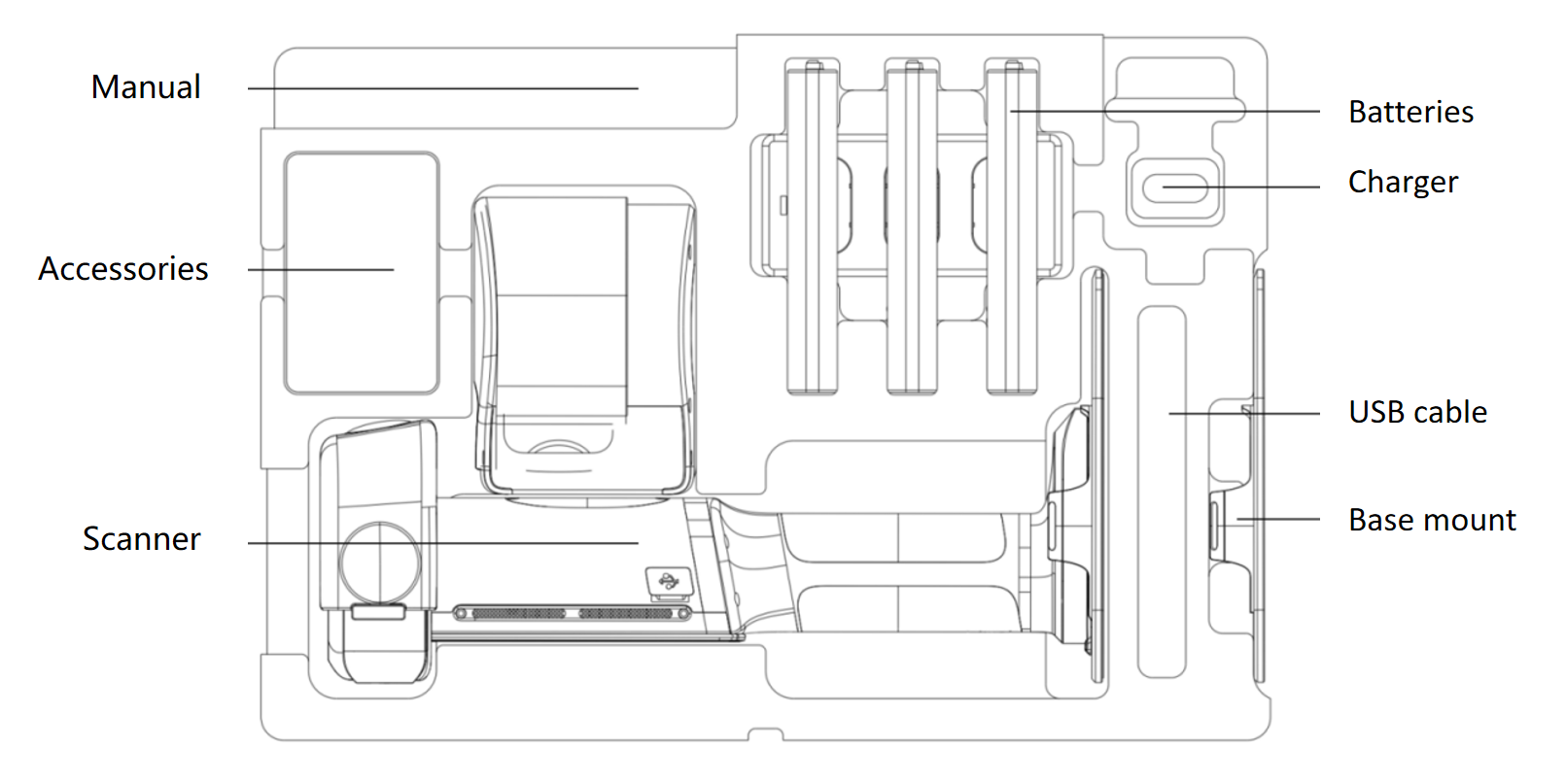
Storage case layout
Storage case layout

Usage precautions

  1. The Lixel L3 is a precision surveying instrument. Drops or impacts can damage it and reduce accuracy.
  2. The Lixel L3 is rated IP54. Do not use it in conditions beyond this rating. Clean it with a soft, dry cloth or the supplied cleaning cloth, and do not touch the LiDAR or lenses with your fingers.
  3. The body gets hot during use. Avoid touching it to prevent burns.
  4. Keep the heat dissipation area uncovered. The device may shut down if it overheats.